A great medical billing service should have a clear plan for your backlog, not just a polished demo. The best medical billing software services options pair useful tools with people who own claim corrections, payer follow-up, and reporting. For your practice, choosing medical billing software starts with a practical question: who handles the work when a claim doesn’t move?
Start by comparing service scope, EHR compatibility, and accountability before comparing subscription prices.
Jump to a section
- Best Medical Billing Software Services Options: Our Ranking
- Compare the Work, Not the Sales Demo
- Test the Features That Handle Exceptions
- Prove EHR Fit Before Signing
- Build a Safe Transition Plan
- Compare Total Cost and Contract Scope
- Judge Performance With Defined Measures
- Frequently Asked Questions
Best Medical Billing Software Services Options: Our Ranking
Our first choice for a practice with unpaid claims and limited billing staff is managed billing support alongside its existing software. We rank the options below for that situation, not for every healthcare organization. A practice with an experienced billing department may put software-only tools first.
1. Managed billing support with your existing EHR
This is our preferred starting point when staffing is the main problem. A service team takes responsibility for agreed billing tasks while your practice keeps its electronic health record, or EHR. That avoids making a clinical software replacement the starting condition for billing support.
The tradeoff is dependency on access, data quality, and a clearly written scope. Confirm whether the agreement includes old balances, appeals, payment posting, and patient billing. Don’t assume all work sits inside one service fee.
2. An integrated EHR and billing platform
An integrated platform ranks second because it suits practices already planning to replace disconnected systems. Clinical documentation and billing work share a platform, but implementation affects more than your billing desk.
Evaluate provider workflows, scheduling, historical data, and staff training together. We wouldn’t replace a working EHR solely because another platform has a better-looking billing screen.
3. Software-only billing tools
Software-only tools fit practices with trained staff who already own coding reviews, corrections, and payer calls. You buy the tools and retain the labor.
This ranks below managed support for an understaffed practice because alerts don’t resolve themselves. Someone still needs to investigate the account and document the next action.
4. Focused support for denials or aging balances
Targeted support fits a specific bottleneck, such as a queue of denied claims or overdue accounts receivable. Accounts receivable, usually shortened to A/R, means money owed to your practice.
Choose this when routine billing works but a defined backlog needs attention. It ranks fourth because fixing old claims without addressing their causes leaves the upstream problem intact.
5. Skip the automation-only promise
Automation without accountable human review is overrated. A tool that flags a missing modifier but leaves nobody responsible for reviewing it adds another task to your queue.
Use AI to support professional judgment, not replace it. Coding decisions still need documentation, payer rules, and qualified review.

Compare the Work, Not the Sales Demo
A useful medical billing software comparison shows who does the work after purchase. Feature lists alone won’t tell you who follows up on a rejected claim or checks an unexpected payment.
The table compares operating models rather than unverified vendor promises. Each model requires a different level of staffing and oversight.
| Option | Best fit | Work your practice retains | Proof to request | Main tradeoff |
|---|---|---|---|---|
| Managed billing with existing EHR | Practice needing ongoing billing labor | Clinical documentation and unresolved clinical questions | Written task ownership and tested EHR workflow | Service quality depends on clear access and accountability |
| Integrated EHR and billing platform | Practice planning a broader system replacement | Training, workflow decisions, and any uncontracted billing tasks | Clinical-to-billing demonstration and migration plan | Change affects clinical and administrative teams |
| Software-only tools | Practice with an experienced billing team | Corrections, appeals, payer calls, and supervision | Staff-tested queues and exports | Software purchase doesn’t supply billing labor |
| Focused denial or A/R support | Practice with a defined backlog | Routine billing and prevention of recurring issues | Account inventory and documented recovery scope | Limited scope may leave upstream causes untreated |
| Automation without service ownership | Narrow, supervised administrative tasks | Exception review and all unresolved follow-up | Human approval controls and activity logs | Flags can accumulate without resolution |
For larger organizations, evaluate ownership by department rather than only by practice. Our Medical Billing Services for Multi-Specialty Groups is a relevant service category for that discussion.
Test the Features That Handle Exceptions
The most useful features of medical billing software expose unfinished work and assign it to someone. Ask for a demonstration using realistic exceptions, not only a clean claim moving through the system.
Follow a claim from submission through payment
A clearinghouse checks and routes electronic claims between your practice and payers. Its acceptance message is not a payment decision. Your software should preserve that distinction and show the claim’s next status.
Ask the presenter to demonstrate a rejection, a corrected submission, and a payer denial. Then ask where the responsible staff member sees the next task.
- Eligibility checks should retain the response and check date.
- Claim edits should explain the issue rather than display only a warning.
- Work queues should show ownership and recent action.
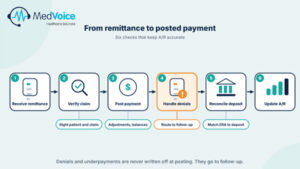
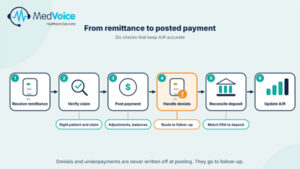
- Payment posting should preserve adjustment reasons and remaining balances.
- Reports should allow account-level review and export.
Check coding support against real documentation
CPT codes describe procedures and services; ICD-10 codes describe diagnoses. Useful software checks relationships between the claim and supporting documentation, but it can’t supply clinical facts that were never recorded.
For example, a same-day procedure and office visit need review against documentation and applicable coding rules. An automatic modifier suggestion is not enough. Ask who approves it and where the decision is recorded.
Make denial follow-up visible
A denial queue should record the payer’s reason, required evidence and assigned owner. Repeatedly resubmitting a claim without resolving the underlying issue is not a follow-up strategy.
Ask the vendor to trace an authorization-related denial. The demonstration should show where staff verify approved dates, covered services, and supporting records.
We offer Denial Management & A/R Follow-Up alongside Medical Billing. When evaluating that support, define which claim categories and follow-up tasks belong in your agreement.
Prove EHR Fit Before Signing
Your exact EHR setup matters more than a broad compatibility claim. Ask vendors to explain how charges, demographic changes, payments, and claim status move between systems.
Shared access, file transfers, and automated interfaces are different arrangements. Each has different staffing needs and failure points. Get the proposed method in writing.
Test the handoffs your staff uses
A compatibility test should follow an encounter through documentation, billing and payment posting. Include your actual workflow requirements without exposing patient information through an unsecured demonstration.
- Confirm supported data fields and transfer direction.
- Identify manual entry that remains with your staff.
- Check how failed transfers become visible.
- Assign responsibility for investigating mismatched records.
- Confirm access to historical claims and payment details.
Review feedback supplied to MedVoice highlights flexibility with a less typical EHR setup. That’s a useful service theme, not proof of compatibility with every platform. Your own workflow still needs validation.
Separate backlog work from new billing
A backlog requires an inventory before anyone can promise a credible schedule. Some accounts need missing documentation; others need enrollment corrections, appeal review, or a decision about further collection work.
Supplied customer feedback also describes onboarding support and communication during a billing backlog. Beginning submissions and resolving every old account are different milestones. Neither should be presented as a promised payment date.
Results can vary based on the practice’s size, specialty, existing EMR/EHR system, patient volume, payer mix, and the completeness of prior documentation.
Build a Safe Transition Plan
A transition plan needs owners for old accounts, new claims, and incoming payments. Without that split, teams can duplicate work or leave accounts untouched.
Before launch, document who handles encounters before the changeover date. Also decide who posts payments received afterward for those older claims.
Define milestones rather than promising instant cleanup
A useful onboarding plan identifies access approval, data validation, staff training, and submission testing. It also lists blockers that stop each milestone.
For example, missing payer access may prevent follow-up even when claim data is available. An unsigned clinical note may prevent a complete billing review. Those are separate issues with separate owners.
Payers control enrollment approvals, claim decisions, and reimbursement timelines.
Review privacy controls and exit rights
Patient information requires controlled access throughout the relationship. Request a business associate agreement, written responsibilities, access controls, and a process for reporting security incidents.
Ask whether staff have individual accounts and whether activity logs record changes. Review how access ends when an employee leaves or the service agreement closes.
Data ownership also belongs in this discussion. Confirm which records you can export, their format, and how long access remains available after termination.
Compare Total Cost and Contract Scope
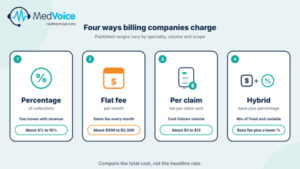
The cheapest proposal can leave the most work with your staff. Compare the full operating cost, including software, billing labor, implementation, and excluded services.
For percentage-based arrangements, ask what counts as collections. For subscription arrangements, ask which users, transactions, and support tasks the fee includes.
Request a written list of exclusions
A proposal should identify whether historical A/R, appeals, patient statements, and coding review are included. It should also explain charges for setup, data exports, training, or additional locations.
Credentialing Services deserve a separate scope discussion. Enrollment work is not the same as submitting claims for an already enrolled provider.
- Define included work and the team responsible.
- Document minimum fees and optional charges.
- Review renewal terms and termination notice.
- Confirm handling of unfinished accounts after exit.
Use the same workload for every proposal
Give each shortlisted provider the same service mix, payer categories, staffing assumptions, and backlog description. Otherwise, you’re comparing different jobs.
We offer a Free Revenue Audit as a starting point for discussing billing gaps. Use its findings to shape scope questions, not as a substitute for a written proposal.
A sound comparison asks what work transfers to the provider and what still lands on your desk. That is more useful than a low headline rate.
Judge Performance With Defined Measures
Performance reports need definitions, reporting periods, and claim-level detail. A polished dashboard can’t explain whether a change came from better processes, different patient volume, or a shift in payer mix.
Ask providers to distinguish these measures before discussing targets:
- Clean claim submission rate: Claims meeting the provider’s stated submission criteria.
- First-pass acceptance rate: Claims accepted at a specified processing stage without resubmission.
- Denial rate: Denied claims or claim lines within a defined population.
- A/R days: Outstanding receivables measured against average revenue using a stated method.
- Revenue collection: Money received within a defined period and scope.
These measures are not interchangeable. Acceptance does not mean payment, and an A/R-day reduction does not establish a payer’s payment speed.
Ask for evidence that matches your practice
A reported result needs context: practice type, baseline and work performed. Avoid treating another organization’s experience as your forecast.
For specialty billing, request examples tied to actual procedures and payer requirements. Behavioral health time documentation, oncology drug units, and procedure modifiers create different review needs.
Our approach pairs AI-enhanced tools with professional billing and coding support. We recommend judging that combination through workflow demonstrations, clear task ownership, and reporting access, not automation claims alone.
Frequently Asked Questions
Does Medical Billing include old unpaid claims?
Medical Billing should include old unpaid claims only when the agreement explicitly places them in scope. Historical accounts can require different work from new submissions, including documentation review and appeal research. Ask us to separate routine billing from Denial Management & A/R Follow-Up and define ownership for each account group.
How quickly can MedVoice start billing after onboarding?
MedVoice’s billing start date requires confirmation after access, documentation, enrollment status, and workflow needs are reviewed. A responsible plan sets milestones for setup and tested submissions rather than promising immediate cleanup. Request a proposed schedule that identifies blockers and distinguishes submission readiness from payer processing and payment.
How should we compare MedVoice’s price with software-only pricing?
To compare MedVoice’s price with software-only pricing, include the staff time required to operate the software. List payer calls, corrections, posting, reporting, and supervision alongside subscription costs. Then compare that workload with the written service scope. Ask for a practice-specific proposal rather than assuming every billing task is included.
Does MedVoice’s AI replace professional coding review?
No, MedVoice’s AI-enhanced approach supports professional work rather than replacing clinical or coding judgment. Code suggestions still require review against documentation and applicable rules. Ask how uncertain recommendations reach a reviewer, who approves changes, and how the system records those decisions for later quality checks.
The Bottom Line
- Choose the staffing model before choosing the software.
- Test exceptions and EHR handoffs, not just clean submissions.
- Put backlog ownership, exclusions, and exit rights in writing.
- Compare defined measures rather than headline promises.
Your next conversation should focus on the work your practice needs someone else to own.
Bring Your Billing Bottleneck to the Table
The best medical billing software services options match your team’s capacity and your unresolved workload. Start with a s
Call MedVoice at (972) 942-0900 to discuss a Free Revenue Audit and whether Medical Billing or broader Revenue Cycle Management fits your needs.